Intoduction
Apache
Apache-Business-Consulting HTML Template
Created : 21/07/2018By : Creativegigs
Thank you for purchasing Apache - Business-Consulting HTML Template. If you have any questions that are beyond the scope of this help file, please feel free to email, via my user page contact form or put a ticket at Support Center .
Thank you so much!
HTML Structure
The html template uses Latest Bootstrap v4.0.0 with valid HTML5 tags. This theme is a responisve layout with 4 column Support column. All of the information in content area is nested within a class and comes with predefined classes.
                                    <div class="col-sm-3 text-right left_speciality">
                                        <div class="row m0 speciaty speciaty1">
                                            <div class="fright icon_circle"><i class="fa fa-magic"></i></div>
                                            <div class="fright texts">
                                                <h4>Unique Design</h4>
                                                <p>Adipiscing elit. Praesent euismod est in fermentum fermentum. Aliquam</p>
                                            </div>
                                        </div>
                                        <div class="row m0 speciaty speciaty3">
                                            <div class="fright icon_circle"><i class="fa fa-flask"></i></div>
                                            <div class="fright texts">
                                                <h4>Creative Template</h4>
                                                <p>Adipiscing elit. Praesent euismod est in fermentum fermentum. Aliquam</p>
                                            </div>
                                        </div>
                                        <div class="row m0 speciaty speciaty5">
                                            <div class="fright icon_circle"><i class="fa fa-cloud-upload"></i></div>
                                            <div class="fright texts">
                                                <h4>Free Updates</h4>
                                                <p>Adipiscing elit. Praesent euismod est in fermentum fermentum. Aliquam</p>
                                            </div>
                                        </div>
                                    </div>
CSS Files and Structure
Mainly four main CSS files are used in this theme. The first one bootstrap.css, second one is style.css which for this template , third one is responsive.css to control responsive layouts and fourth one is color.css to control the color scheme of template.
If you would like to edit a specific section of the site, simply find the appropriate label in the CSS file, and then scroll down until you find the appropriate style that needs to be edited.
Jquery and javascript
This theme imports three types of Javascript files.
- jQuery
- Custom scripts (theme.js)
- Scripts for google map (map-script.js)
- Some plugins on vendor folder
- jQuery is a Javascript library that greatly reduces the amount of code that you must write.
- Most of the animation in this site is carried out from the customs scripts. There are a few functions worth looking over.
In addition to the custom scripts, I have implemented few "tried and true" plugins to create the effects. This plugin is packed, so you won't need to manually edit anything in the file. The only necessary thing to know is how to call the method
Google Map Settings
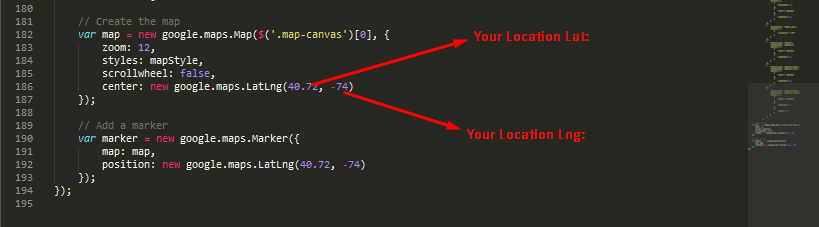
You have to change latitude and longlatitude from main.js file. You can locate that file from js folder. To find your location's latitude and longlatitude click here
Color scheme Settings
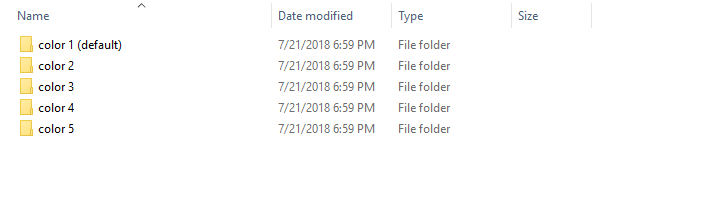
There are 5(Five) pre-ready color schemes included with this theme. You will find this color css file in "color css" folder. we have separate each color css file into diffrent folder. In Every folder there is a color.css file. All you need to do to use this color, just copy the color.css file and replace it into css folder.
Contact Form Settings
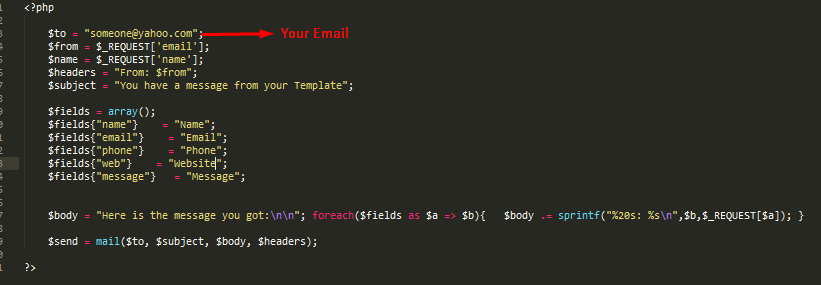
We have added an attractive and fully functional contact form. You need to update the recipient name and email address.
You can change recipient name and email address in sendemail.php
Sources and Credits
Fonts Used int the template are google fonts, you can find theme on Google Fonts API
Fonts Used are :
Font Used:
Sliders Used Are :
Camera Carousel
Owl Carousel 2 ( https://owlcarousel2.github.io/OwlCarousel2/docs/started-welcome.html )
Every Code is properly commented for Editing Ease.
Support
Once again, thank you so much for purchasing this theme. As I said at the beginning, I'd be glad to help you if you have any questions relating to this theme. No guarantees, but I'll do my best to assist. If you have any queries, please feel free to contact us at Support Center.
Email Us at : creativegigs